

How to Reduce Unplanned Downtime in a Manufacturing Plant (Without Buying New Sensors)
It is 2 a.m. The shift engineer calls: the cooling-water pump on the reactor block has seized. The standby pump is under repair, the bearing is not in stores, and the batch has to be held. In the morning meeting, everybody asks the same question: "Did nobody see this coming?"
In most plants, the honest answer is that the data saw it coming, but no person did. The vibration and temperature readings were sitting in the PLC or the historian for days. Nobody reads 400 trends a day.
In short: Unplanned downtime falls when three things happen together. Every critical asset is compared with its own normal behaviour every day. Each early warning is turned into a specific action with an act-by date. The spare part is checked before the job is planned. You rarely need new sensors to start, because most plants already record enough signals in their PLCs, historians and work-order history.
Why machines keep breaking "without warning"
Breakdowns are rarely caused by careless people. They are caused by facts that are spread across too many places:
- Signals nobody watches. Vibration, temperature, current and pressure are logged, but nobody is assigned to read the trend of every pump, motor and gearbox every day.
- Limits that were never written down. If nobody declared what "abnormal" means for a machine, no alarm fires until it is far too late.
- Slow follow-up questions. Even when someone notices, the next questions take a day of phone calls: which component is failing, is the spare in stock, and when can we stop the machine?
- Repairs nobody verifies. After a fix, nobody checks whether the readings actually returned to normal, so the same failure returns.
The cost is not only the repair. It is overtime, a held batch, an emergency purchase at three times the price, and a customer delivery at risk.
A practical 5-step method to reduce unplanned downtime
You can apply this method with any system, including spreadsheets. It is simply what good reliability teams do.
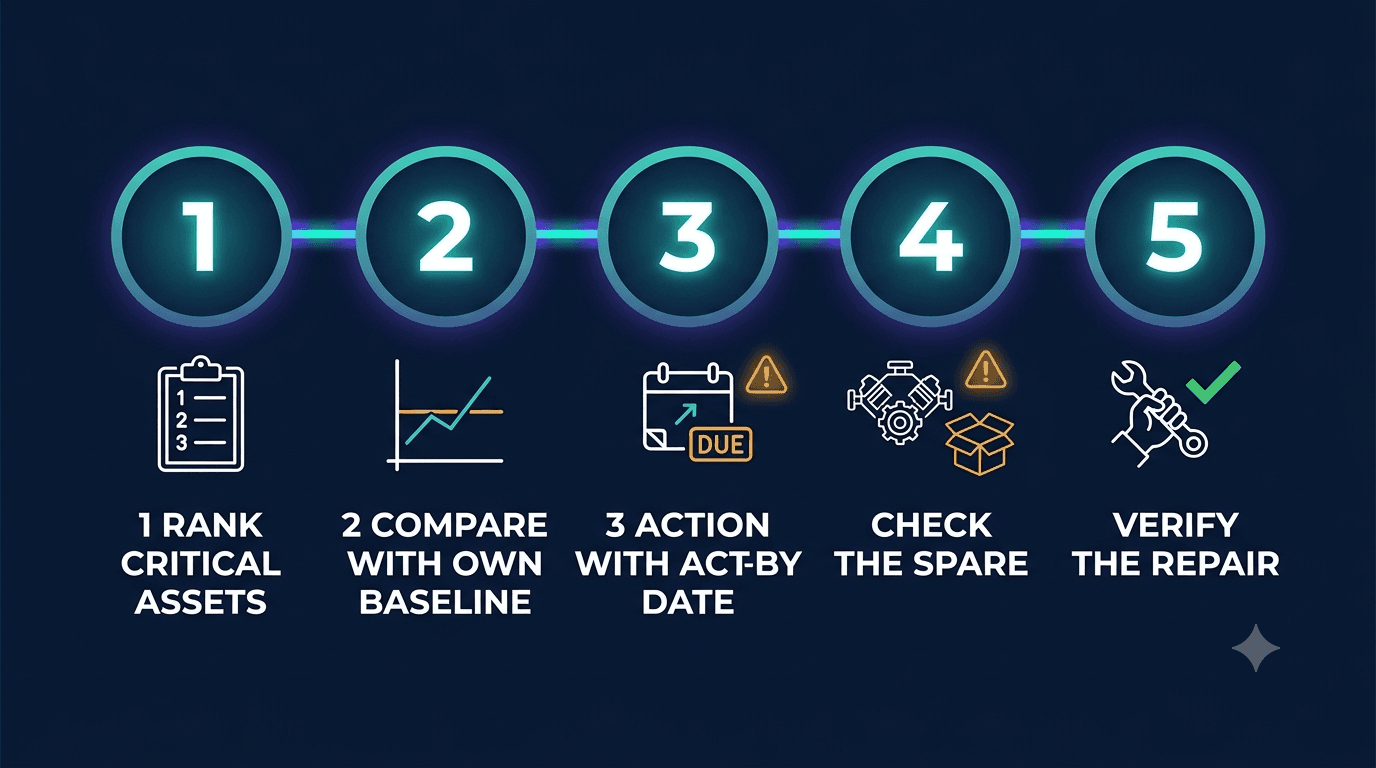
1. Rank your assets by criticality
Start with the 20 to 50 assets whose failure stops production, creates a safety risk, or has no standby. Do not try to monitor everything on day one.
2. Compare each asset with its own baseline
Generic thresholds create false alarms. A pump that always runs at 4 mm/s is not the same as one that has risen from 2 to 4 mm/s in ten days. Watch for change against each asset's own history and operating regime.
3. Turn every warning into an action with a date
"Vibration high" is not useful at 9 a.m. A useful warning says which asset, which component, what action, how urgent, and by when. The act-by date should respect the asset's criticality, the next planned maintenance window, and the date the spare can arrive.
4. Check spares before you plan the job
A planned repair becomes an emergency if the part is not there. Check stock the moment a failure is suspected, and raise the purchase request the same day.
5. Verify every repair
Compare the readings before and after the repair. Classify the result as restored, partly restored or not restored. Without this step, you are never sure the problem is gone.
How MIRA does this automatically
MIRA is Techseria's AI plant-intelligence platform. It turns the five steps above into a daily routine that runs without anyone chasing it.
- It reads what you already have. MIRA connects to PLCs and historians over OPC-UA, Modbus TCP and RTU, Siemens S7, Allen-Bradley EtherNet/IP, MQTT/Sparkplug B and OSIsoft PI Web API, as well as work-order history from Excel, SAP or FacilityFlow. No proprietary sensors or gateways are needed.
- It scans every morning. MIRA runs a daily anomaly scan that compares each asset with its own baseline, per operating regime and across several signals. It also updates an equipment health score (0–100) with the confidence of each score shown.
- It detects fault signatures. MIRA evaluates vibration band features against 13 fault rules, including unbalance, misalignment, looseness, cavitation and bearing-defect energy.
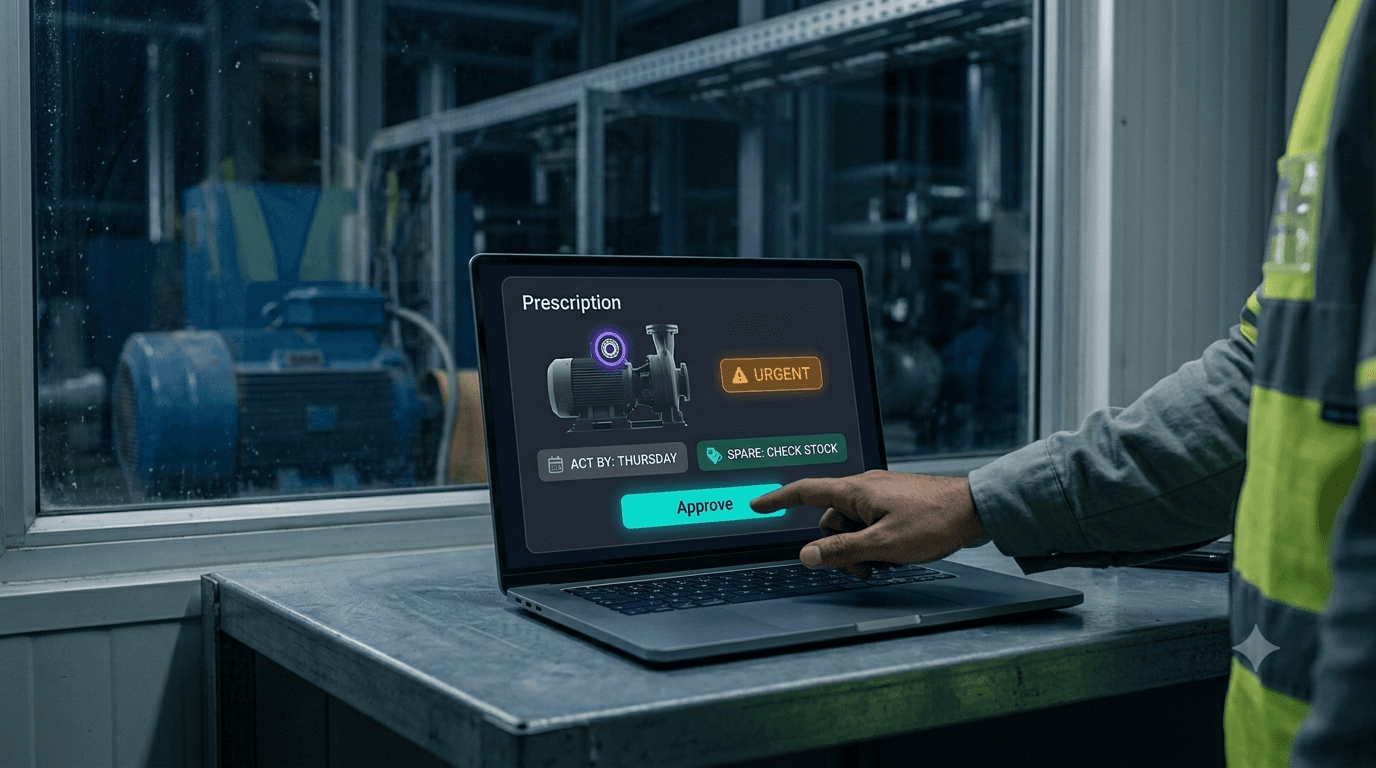
- It writes a prescription, not just an alert. A prescription names the asset, the component, the action, the urgency and an act-by date, and states whether the spare is in stock.
- A person approves. The maintenance head reviews the prescription, and it becomes a work order only through the approval gate.
- It verifies the repair. Repair Verification compares telemetry before and after the job and gives a verdict.
So the repair is planned for Thursday's maintenance window instead of an emergency at 2 a.m. The spare arrives before the job. And there is written proof that the fix worked.
What you need to get started
MIRA is honest about what each capability needs:
- Vibration or temperature readings reaching MIRA from a PLC, historian or gateway, or pushed by API.
- Work-order history, from Excel, SAP or FacilityFlow.
- An approved FMEA row for the fault mode, which MIRA helps your engineers draft. This is what binds a detected fault to an approved action.
- For bearing-race-level diagnosis and ISO 20816 zone letters, your plant loads its bearing catalogue, machine kinematics and severity table. These ship empty on purpose, because guessed reference values produce confident wrong answers.
If data is missing, MIRA says what is missing and where to supply it. It never fills a gap with a guess.
Frequently asked questions
Can I reduce unplanned downtime without installing new sensors?
Yes, in most plants. PLCs, SCADA historians, energy meters and work-order history already hold early signs of failure. Start with the critical assets that already have signals, and add sensors only where there is a clear gap.
What is the difference between predictive and prescriptive maintenance?
Predictive maintenance tells you something is changing. Prescriptive maintenance tells you what to do about it: the component, the action, the act-by date and whether the spare is available.
Can MIRA tell me exactly how many days a machine has left?
Not out of the box. A reliable remaining-life estimate needs confirmed failure history on your own equipment. What MIRA gives from day one is an act-by date based on criticality, the maintenance window and the date the part will be ready.
Will the AI shut down or change equipment by itself?
No. MIRA proposes the action and your engineer approves it. Each action type has a confidence threshold that your team controls.
Stop the 2 a.m. calls
Think of your last three breakdowns. Were the signals there beforehand? Who would have seen them? If the answer is "the data was there, nobody saw it", MIRA was built for your plant. Explore MIRA or book a demo and bring your own data.
See MIRA on Your Own Plant Data
Bring a month of work orders, a meter export or a PLC tag list. We'll show you what MIRA finds, and what it needs to find more. Unlimited users and assets, installed inside your network.
Ready to accelerate your operations?
See how custom AI solutions, ERPNext integration, and workflow automations can lower your operating costs. Book your free 30-minute Workflow Audit with a senior engineer.